Ludus creates a WireGuard server on the Proxmox host itself. You connect to it from your PC and only the traffic to the lab (10.2.0.0/16) goes through the tunnel; your Internet traffic still goes through your normal network.
Generating the configuration
On the Proxmox host:
terminal
ludus --user <range-user> users wireguard > /root/goad-wireguard.conf
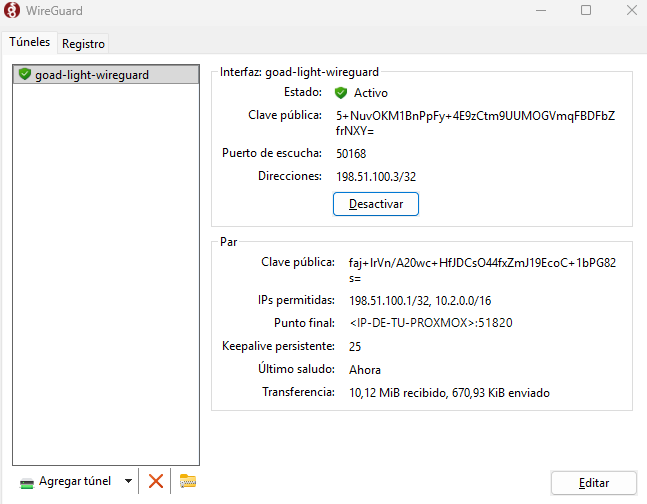
Open the WireGuard app, import the .conf and click Activate. If all goes well, the tunnel shows as Active and the latest handshake is recent:
The WireGuard app with the goad-light-wireguard tunnel active: allowed IPs 198.51.100.1/32 and 10.2.0.0/16, latest handshake "Now" and traffic in both directions
Check that you can reach the lab:
powershell
ping 10.2.10.10
ping 10.2.20.2
On Windows: connecting and disconnecting from the console
The tunnel becomes a Windows service. If you import it as a service, it starts on its own at every reboot.
If your attack machine is Linux (Kali, for example), the flow is the same with wg-quick.
Install WireGuard
terminal
sudo apt updatesudo apt install -y wireguard
Copy the configuration
Copy the .conf from Proxmox to /etc/wireguard/ with whatever interface name you like, and restrict its permissions, because it contains the private key:
sudo wg-quick up goad-lightsudo wg show$ ping -c 2 10.2.10.10
wg show should list a recent latest handshake, just like the Windows app. Since AllowedIPs only includes 198.51.100.1/32 and 10.2.0.0/16, only lab traffic goes through the tunnel and your Internet traffic is unchanged.
Disconnecting and starting at boot
terminal
sudo wg-quick down goad-light
If you want it to come up on its own at boot, enable it as a service (optional):
terminal
sudo systemctl enable --now wg-quick@goad-light
If you use WSL on Windows
You do not need to install anything in WSL: with the tunnel active on Windows, WSL traffic goes through it. In my case, nxc run from WSL reached the lab with no extra setup, and the hosts saw the Windows tunnel IP (198.51.100.3) as the source.
Isolation
The vulnerable machines are only reachable from the tunnel, not from the rest of your network. The VMs do have Internet access (GOAD downloads installers during deployment), so if you want to cut it, Ludus lets you block it per VM with testing: block_internet: true. Do not open port 51820 on your router to the outside.