Ludus and GOAD are heavy. My root partition was 96 GB and was not enough for GOAD, so I put it on the 1 TB disk. Pick a place with enough space before cloning it.
Installing Ludus
Download the official installer, read it and run it on the Proxmox host as root.
The storage for VMs (I used local-lvm) and for ISOs (local)
The web admin email (it can be a made-up one such as lab-admin@local.invalid)
It takes a good while. It downloads firmware and a new Proxmox kernel, installs Ansible and configures WireGuard and the internal network. It is not stuck, this is normal.
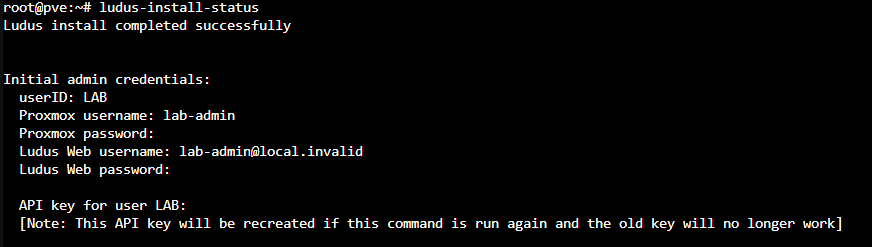
To follow the progress and see the initial credentials and the API key it generates:
terminal
ludus-install-status
ludus-install-status output once finished: installation complete, LAB user and the initial credentials (passwords and API key hidden here)
Save the API key somewhere safe the first time you see it. The output itself warns that if you run ludus-install-status again, the API key is regenerated and the previous one stops working. When the installation finishes, two Ludus services are running.
If ludus later answers No Ludus API key found in system keyring, that session does not have the key loaded. Fix it by exporting the key you saved in the current session, or by storing it with the apikey command:
terminal
$ export LUDUS_API_KEY='<your-api-key>'
VM templates
Ludus builds the VMs from templates that are created once. GOAD-Light needs three.
terminal
ludus templates listludus templates build -n debian-12-x64-server-template,win2019-server-x64-template
Windows Server 2019 is the slowest. With a 6-core i5, build them one at a time.
There is a third template I missed: the lab router uses Debian 13. If it does not exist, the GOAD deployment stops before creating the VMs.
terminal
ludus templates build -n debian-13-x64-server-template
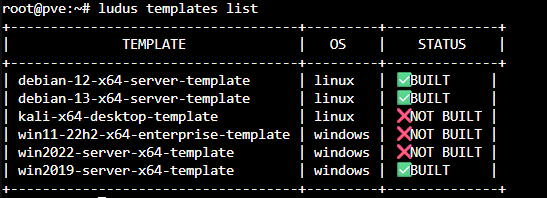
Check that all three show as built before moving on.
terminal
ludus templates list
ludus templates list: the debian-12, debian-13 and win2019 templates show as BUILT; the others are not needed for GOAD-Light